
Thats right I’m embarking on a “jounrni” to learn terraform, this is very early days but I’m trying to get a grasp on the fundamentals. Through this I’ll go through how to install terraform on Windows along with some of the definitions that you’d need to know for terraform.
What actual is terraform?
So Terraform is an infrastructure as code or IaC (if you want to sound fancy) tool that lets you define cloud and on prem resources using config files. This way it provides a way to provision resources in a consistent fashion. Here are the following advantages:
- Track and manage your infrastructure as a source of truth with git control where we can collaborate
- Automate changes – tf files are declarative meaning they describe the end state of your infrastrucutre without writing step by step instructures which is prone to human error
- Standarise configurations – allows for consistent resources and for you to implement the best practices for your infrastructure
Installing Terraform
So you first must install chocolatey (I know great name). To do this you must open the cli or powershell on administrator and bypass any policy:
Set-ExecutionPolicy Bypass -Scope Process -Force; [System.Net.ServicePointManager]::SecurityProtocol = [System.Net.ServicePointManager]::SecurityProtocol -bor 3072; iex ((New-Object System.Net.WebClient).DownloadString('https://community.chocolatey.org/install.ps1'))
Once that is done you can then install terraform via:
choco install terraform
Fundamentals
Providers
Terraform has lots of provides for you to connect to, to build infrastrucutre which is basically a plugin that talks to an API e.g. AWS, GCP, Azure etc. Providers are downloaded by terraform init. Each provider exposes resource types and data sources. You configure credentials once and all resources inherit them.
terraform {
  required_providers {
    aws = {
      source  = "hashicorp/aws"
      version = "~> 5.0"
    }
  }
}

provider "aws" {
  region = "eu-west-1"
}
Resources
The most common block. First label is the type (from the provider), second is your local name. Terraform will create, update, or destroy this to match your config.
resource "aws_s3_bucket" "my_bucket" {
  bucket = "my-unique-bucket-name"

  tags = {
    Environment = "dev"
  }
}

# reference it elsewhere
aws_s3_bucket.my_bucket.id
State
The State or the source of truth that maps your config to real reources. Terraform records what it created in a state file. On every plan/apply it compares desired config → state → real infra and figures out what to change. Never edit it manually.
# inspect state
$ terraform state list
$ terraform state show aws_s3_bucket.my_bucket

# import existing resource into state
$ terraform import aws_s3_bucket.my_bucket bucket-name

# remove from state (without destroying)
$ terraform state rm aws_s3_bucket.my_bucket
Module
A module is a packaged, reusable group of resources essentially a folder of tf files. Call it from a parent config to reuse patterns across projects. The Terraform Registry has thousands of community modules.
module "vpc" {
  source  = "terraform-aws-modules/vpc/aws"
  version = "5.0.0"

  name = "my-vpc"
  cidr = "10.0.0.0/16"
}

# reference module output
module.vpc.vpc_id
Variables
Variables allow you to make your config reusable and parametrised rather than having things hard coded. Variables let you reuse configs across environments. Set values via .tfvars files, env vars (TF_VAR_name), or CLI flags.
variable "env" {
  type        = string
  default     = "dev"
  description = "Deployment environment"
}

# use it
resource "aws_instance" "app" {
  tags = { Env = var.env }
}
Outputs
Outputs print to the terminal after apply and are queryable with terraform output. Essential for passing values between modules.
output "bucket_arn" {
  value       = aws_s3_bucket.my_bucket.arn
  description = "ARN of the created bucket"
  sensitive   = false
}

# query it
$ terraform output bucket_arn
Worflow
Providers give you resource types → Resources are what you declare → State tracks what exists → the workflow is how you move between “desired” and “real”. The follow is the workflow steps
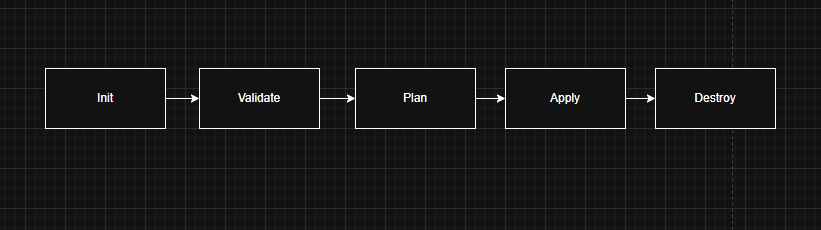
- Init – sets up working directory, downloads providers and modules in your config. Run this once per project or when you add new providers
- Validate – Checks that your .tf files are syntactically valid and internally consistent. Doesn’t touch real infra or make API calls.
- Plan – Compares your config against state and real infra, then prints what it WILL do. + = create, ~ = update, – = destroy. Nothing changes. Always review before apply.
- Apply – Executes the plan. Prompts for confirmation unless you pass -auto-approve. Updates state file after success. If it was saved from plan, it executes exactly that plan.
- Destroy – Destroys all resources managed by the current state. Use -target to destroy a single resource. Prompts for confirmation. Irreversible — check the plan output carefully.
The three rules that trip everyone up early on:
- Never edit
.tfstateby hand — useterraform statecommands - Always
planbeforeapplyand actually read the output - Store state remotely (S3 + DynamoDB, or Terraform Cloud) the moment more than one person touches the project