
👋 Hey there! This video is for members only.
Please log in or create a free account below.
Login / Sign Up
Hello and welcome back! 👋
In this post, I’m going to walk through Markdown in Databricks — what it is, why it’s useful, and the advantages of using it (along with a helpful cheat sheet). I’ll also share my own thoughts on when and how I use it, and a few best practices for making your notebooks look professional and easy to follow.
What is Markdown?
Markdown isn’t specific to Databricks. It’s a lightweight markup language used to format text, create structure, and make content more readable. Think of it like a simple way to make a Word document, but directly inside your code notebooks.
You’ll find Markdown in:
- Databricks notebooks (our focus today)
- Jupyter notebooks (very similar)
- GitHub and Azure DevOps (great for documentation and collaboration)
With Markdown, you can add:
- Titles and headings
- Lists (ordered and unordered)
- Tables
- Links and images
- Notes, blockquotes, and code snippets
- Even math equations if you need them
It’s mainly used for documentation — helping you explain your code, structure your workflow, and make your work easier for others (and yourself!) to follow.
Cheat Sheet
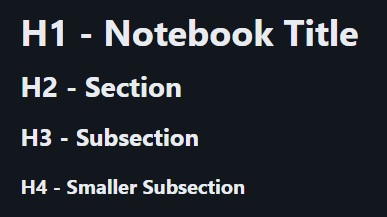
Titles
%md
# H1 - Notebook Title
## H2 - Section
### H3 - Subsection
#### H4 - Smaller Subsection
Highlight & Next Line
%md
*Italic* or _Italic_
**Bold** or __Bold__
***Bold & Italic***
<br/> --next line
~~Strikethrough~~

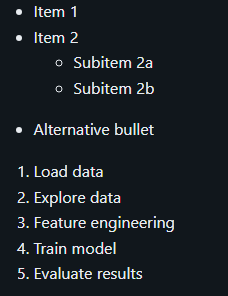
List
%md
- Item 1
- Item 2
  - Subitem 2a
  - Subitem 2b
* Alternative bullet
1. Load data
2. Explore data
3. Feature engineering
4. Train model
5. Evaluate results
Inline Code
%md
```
hi
my name is
```
`inline`

Link & Links in Notebooks

%md
<a href="$./test.png">Link to notebook in same folder as current notebook</a>
<a href="$../Markdown">Link to folder in parent folder of current notebook</a>
<a href="$./test/test">Link to nested notebook</a>

BlockQuote
%md
> Note: this is how to use a blockquote

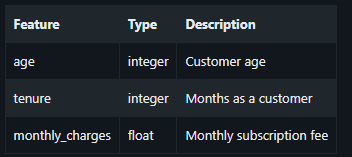
Table
%md
| Feature       | Type      | Description                     |
|---------------|-----------|---------------------------------|
| age           | integer   | Customer age                    |
| tenure        | integer   | Months as a customer            |
| monthly_charges | float   | Monthly subscription fee        |
Equations
%md
Area of a circle is $\pi r^2$

And, the area of a triangle is:

$$
A_{triangle}=\frac{1}{2}({b}\cdot{h})
$$

Images Including formatting
%md

%md
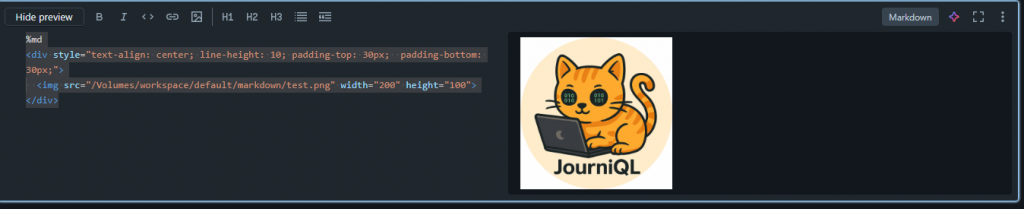
<div style="text-align: center; line-height: 10; padding-top: 30px;  padding-bottom: 30px;">
  <img src="/Volumes/workspace/default/markdown/test.png" width="200" height="100">
</div>
You can either drag and drop images, uploade them to your device or add them to a volume
Using UI
Using the UI you can also add multiple features without memorising the markdown code:
FYI – For emojis I usually just copy them in from teams for example
Advantages of Markdown in Databricks
- Readability – Makes notebooks clean and easy to follow.
- Reproducibility – Clear step-by-step explanations help others (or your future self) rerun your work.
- Organization – Adds structure to notebooks so you’re not just scrolling through raw code.
- Documentation – Perfect for explaining what your code is doing and why.
- Professionalism – Well-documented notebooks look polished and are easier to share with teams or in production.
- Collaboration – Great for production code that’s reused often — Markdown makes it much clearer for others.
Best Practices & Tips
Here are some quick ways you can use Markdown effectively in Databricks:
- Start with a title – use headings (
#,##,###) to create clear sections. - Highlight important notes – with bold or italic.
- Links – insert references or resources neatly with
(url). - Images – use when appropiate, can make it more professional if used correctly or messy if images are too big, used often and are not structured
- Tables – trickier to format, but once you’ve done one, you’ll get the hang of it.
- Dashboards – use Markdown cells to add clarity when presenting.
- Keep it concise – too much text can overwhelm and distract from the code.
My Thoughts
Personally, I think Markdown is essential when your code is reused often or when you’re explaining results to others. It makes notebooks more repeatable and much easier for a team to collaborate on.
That said, not every project needs heavy Markdown. If you’re in the early stages of development, it might make more sense to keep notes elsewhere (e.g., GitHub or DevOps) and add Markdown once the code stabilizes.
The key is balance: use enough Markdown to make your work clear and professional, but don’t let it overshadow the code itself.
Conclusion
Markdown in Databricks is a simple but powerful way to:
- Communicate insights
- Organise your work
- Make notebooks professional and readable
It’s easy to learn, flexible across different platforms, and a great practice for any data professional.
If you want to dive deeper, I’ll also share a cheat sheet and useful links in the blog version of this post.
Thanks for reading — and happy documenting! ✍️