
If you’re using dbatools with PowerShell and run into the error:
“The certificate chain was issued by an authority that is not trusted”
This is a fairly common issue when working with remote SQL Server connections. The good news? There’s a simple fix 🙂
❓ Why This Error Happens
This message means that your machine does not trust the SSL certificate used by the SQL Server. In some (often secure) environments, servers are often set up with self-signed or internal certificates. So when using dbatools, it tries to connect over TLS/SSL, hence the error. I like to think of it like the popup here where we have to select “trust server certificate” but isnt conifgured in powershell:
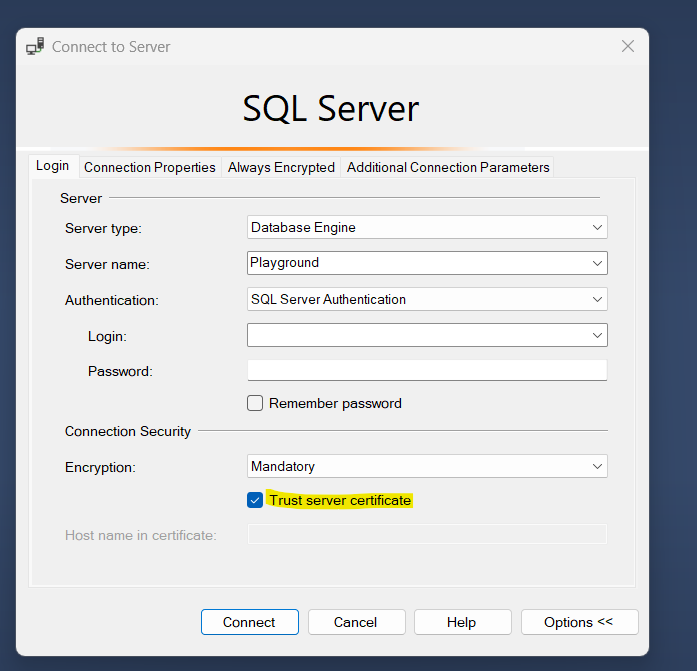
If you’re connecting to a test or dev server, or anything outside a properly configured CA (Certificate Authority) setup, its likely you’ll see this.
✅ The Quick Fix: Set an Insecure Connection for the Session
To bypass this just for your current PowerShell session, run:
Set-DbatoolsInsecureConnection -SessionOnly
This tells dbatools or other modules to allow connections even if the certificate isn’t trusted.
🔒 Note:
Use this only when the server is safe and avoid using this in production unless absolutely necessary.
🔁 Need to Reuse It Often?
If you want to run this often and require a permanent fix then you can set the global configuration like so:
Set-DbatoolsInsecureConnection -SessionOnly:$false
But again, use with caution. For best practices, aim to install trusted certificates on the machines to manage these long term.
🧠 Pro Tip: Diagnosing Further
If this is still causing an error, try using the Connect-DbaInstance command with -EnableException flag to get a detailed error message:
Connect-DbaInstance -SqlInstance "YourServerName" -EnableException
This can help you confirm the issue and not something else like firewall, port, or login credentials.
🔍 Final Thoughts
Working with SSL in dbatools is important for SQL Server connections, but in non-production setups, you might not always have valid certificates. Instead of turning off security globally, use the Set-DbatoolsInsecureConnection -SessionOnly command to keep things smooth and safe.